Best Sora 2 Alternatives in 2026: 10 Tools Compared
Last updated: July 2026.
Best Sora 2 Alternatives in 2026: 10 AI Video Generators Compared
The best Sora 2 alternatives in 2026 include Hedra, Google Veo 3.1, Kling 3.0, Runway Gen-4.5, and Seedance 2.0. Each one solves a different problem, from budget-friendly clip generation to full multi-model content workflows with brand kit support.
OpenAI removed Sora 2's free tier on January 10, 2026. What was once accessible to anyone now requires a ChatGPT Plus subscription at $20 per month or a ChatGPT Pro subscription at $200 per month. Geographic restrictions limit access to the United States and Canada, and credit-based pricing means most creators run out of generations long before the month ends.
The result: millions of creators are searching for alternatives that offer comparable video quality without the access barriers. This guide compares 10 tools across quality, pricing, creative control, and real-world use cases. It also addresses a question most comparison guides skip entirely: should you replace Sora 2 with one tool, or use a platform that gives you access to multiple AI video models in a single workflow?
Why Creators Are Looking for Sora 2 Alternatives
The demand for Sora 2 alternatives is not about dissatisfaction with OpenAI's video quality. The technology is impressive. The problem is everything surrounding it: pricing, access, and restrictions that make it impractical for most content workflows.
Pricing and Credit Restrictions
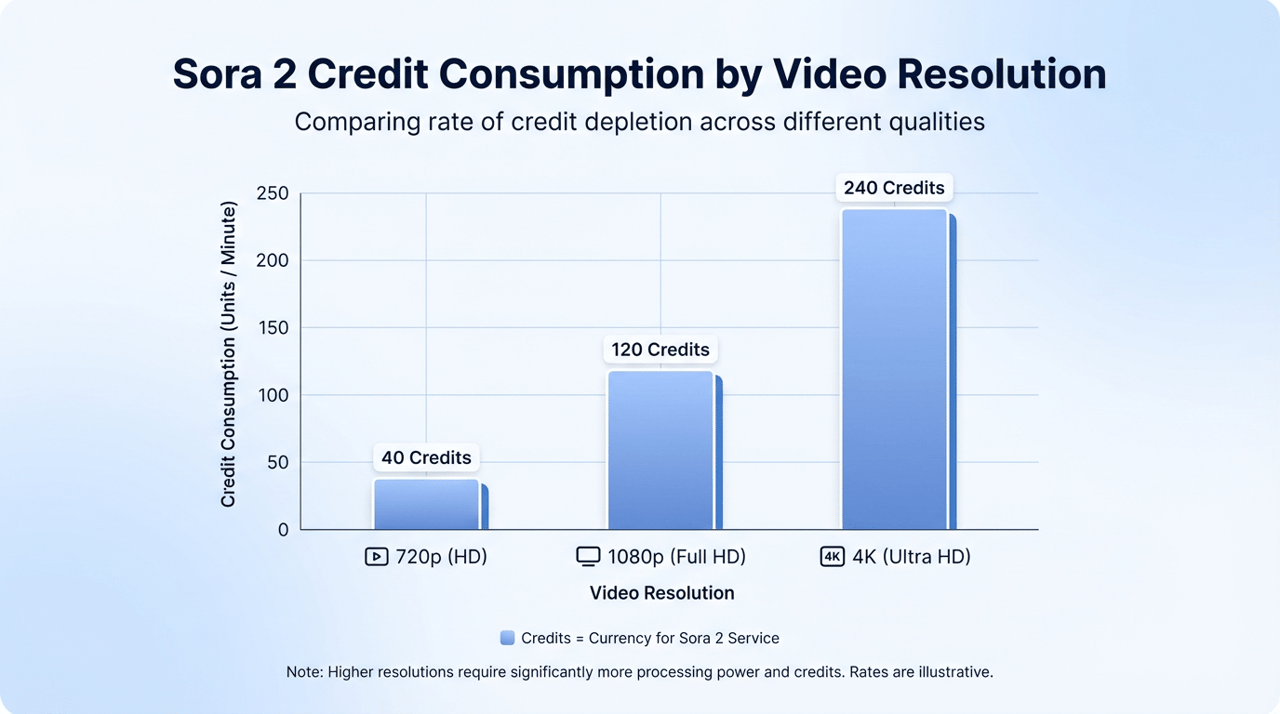
Sora 2 operates on a credit-based system where costs scale dramatically with resolution and duration. A single 5-second clip at 720p consumes 80 credits on the ChatGPT Plus plan, which provides only 1,000 credits per month. That translates to roughly 12 short videos before the credits run out (AI Free API, 2026).
Here is how the pricing breaks down:
Plan | Monthly Cost | Credits | Max Resolution | Max Duration | Watermark |
|---|---|---|---|---|---|
ChatGPT Plus | $20/month | 1,000 | 720p | 5-10 seconds | Yes |
ChatGPT Pro | $200/month | 10,000 | 1080p | 20 seconds | No |
API (Sora 2) | Pay-per-use | N/A | 720p | 12 seconds | No |
API (Sora 2 Pro) | Pay-per-use | N/A | 1080p | 25 seconds | No |
For creators who need volume, the math does not work. The ChatGPT Pro plan at $200 per month yields approximately 50 videos at 720p resolution (AI Free API, 2026). That is $4 per short clip, which adds up fast when producing content for multiple platforms.
Geographic and Access Barriers
Sora 2 launched exclusively in the United States and Canada. As of January 2026, it also requires phone number verification, adding another friction point for international creators and teams working across regions.
These limitations are significant in a market where 91% of businesses now use video as a marketing tool (Wyzowl, 2026). The demand for accessible, high-quality video creation is growing faster than any single platform can serve, especially one with geographic and pricing walls around it. As a result, the broader AI video landscape is shifting toward open-access platforms that remove these barriers entirely.
What to Look for in a Sora 2 Alternative
Before comparing individual tools, it helps to define what actually matters. Most comparison guides rank tools by demo quality, which tells you very little about how a platform performs in a real content workflow.
Five Criteria That Actually Matter
1. Video quality. Resolution, motion realism, and physics accuracy determine whether output looks professional or obviously AI-generated. Look for tools that produce 1080p or higher with stable character movement. If output falls short, AI video upscaling can bridge the gap.
2. Pricing transparency. Credit-based systems can obscure true costs. The best alternatives offer predictable pricing where you know exactly what each video will cost before generating it.
3. Creative control. Camera direction, character consistency across scenes, and style locking separate professional tools from basic generators. If you need output that matches a specific visual direction, this is non-negotiable. When consistency issues do arise, tools for fixing glitchy AI video can help salvage otherwise strong output.
4. Workflow integration. This is the most overlooked criterion. Can the tool fit into a content production pipeline? Does it handle formatting for different platforms? Or is it a standalone clip generator that leaves you to assemble everything else manually?
5. Model variety. Different AI video models excel at different things. A tool that offers access to multiple models gives you flexibility to choose the right engine for each project, rather than accepting the limitations of one. Understanding the difference between world simulation models and character performance models is key to making the right choice.
The best Sora 2 alternative depends on whether you need a single clip generator or a complete content creation workflow. For creators producing social content at scale, the workflow question matters more than any individual model benchmark.
10 Best Sora 2 Alternatives in 2026
Each tool below is evaluated against the five criteria above, with honest assessments of strengths and limitations. The list is ordered by versatility and workflow fit, not by a single quality metric.
1. Hedra - Best Multi-Model Platform for Complete Content Workflows
Hedra takes a fundamentally different approach to AI video. Instead of offering one proprietary model, it provides access to Sora 2, Veo, Kling 3.0, Seedance, Hedra Omnia, Character-3, and 10+ additional models in a single interface. This means you do not need to choose between tools. You choose the right model for each project.
The platform's standout feature is Agent, a conversational creative system. Describe the outcome you want, and Agent handles model selection, brand application, and platform formatting. It remembers context across the conversation, so revisions build on previous work rather than starting over. For more on how AI agents are changing content workflows, see best AI agents for content creation.
- Best for: Creators and businesses who need finished, on-brand content across multiple platforms
- Key features: Multi-model access, Agent workflow, brand kit integration, image-to-video generation, AI image generator with 14+ models, AI avatar creation, AI audio-driven facial animation, photo to talking video, and face swap
- Pricing: Free plan available. Paid plans start at $15/month (Basic), $30/month (Creator), and $75/month (Professional)
- Limitations: Credit-based system where monthly credits do not roll over. The platform is powerful but has a learning curve for users unfamiliar with multi-model workflows
Why it ranks first: Most alternatives solve the Sora 2 access problem by offering a different single model. Hedra solves the bigger problem: no single model is the best at everything. By aggregating multiple AI video generators in one workspace, it gives creators the flexibility to pick the right tool for each job without managing separate subscriptions.
2. Google Veo 3.1 - Best for Native Audio Generation
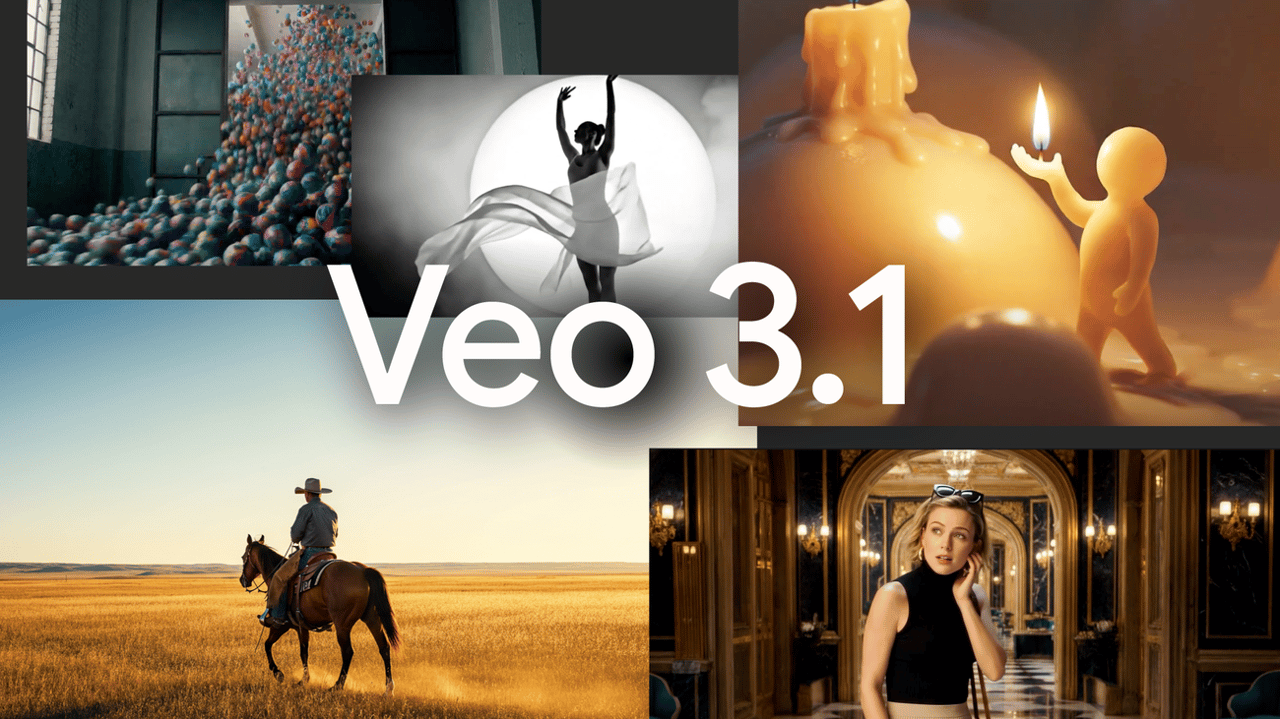
Google Veo 3.1 is one of the most technically advanced video models available. It produces true 4K output at 3840x2160 pixels with 60fps and generates synchronized audio, including ambient sound, dialogue, and sound effects, directly within the video.
- Best for: Cinematic storytelling and projects that require built-in audio
- Key features: 4K resolution, native audio generation, precise camera control, strong prompt understanding
- Pricing: Available through Google AI Pro ($19.99/month for Veo 3.1 Fast) or Google AI Ultra ($249.99/month for full Veo 3.1). Also accessible via Gemini API at $0.15-$0.40 per second
- Limitations: The Pro plan provides limited Veo 3.1 Fast access only. Full Veo 3.1 capabilities require the Ultra plan at $249.99 per month, which is prohibitively expensive for most creators. Short clip durations of 8 seconds per generation
Veo 3.1 excels when audio-visual coherence is critical. If you are producing cinematic content where sound design matters, it is currently unmatched.
3. Kling 3.0 - Best Value for Motion Quality
Kling 3.0, developed by Kuaishou, delivers impressive motion realism at a price point that undercuts most competitors. Its physics-driven movement system produces characters that move naturally, making it especially strong for social media content, dance sequences, and product demonstrations.
- Best for: Social media creators and marketers who need realistic motion at a budget price
- Key features: 15-second clip generation, strong human motion, advanced motion control, daily free credits on some plans
- Pricing: Starting at $6.99/month
- Limitations: Character consistency across multiple shots can drift. Less precise camera control than Runway or Veo
For creators working within tight budgets, Kling 3.0 offers the strongest balance of quality and affordability in the current market.
4. Runway Gen-4.5 - Best for Creative Control
Runway has long been a favourite among filmmakers and designers, and Gen-4.5 continues that reputation. It earned one of the highest ratings on the Artificial Analysis Text-to-Video benchmark, reflecting its strength in cinematic realism and visual polish.
- Best for: Professional filmmakers, designers, and creators who need precise editing control
- Key features: Advanced image-to-video, scene expansion, 4K upscaling, detailed creative control
- Pricing: Free trial with 125 credits. Standard at $15/month, Pro at $35/month, Unlimited at $95/month
- Limitations: Credit-based pricing can be difficult to predict. The interface may feel complex for beginners
Runway is the right choice when you need frame-level control over output and are willing to invest time in learning the platform.
5. Seedance 2.0 - Best for Multi-Modal Inputs
Seedance 2.0 from ByteDance supports up to 12 input references, including images, videos, and audio. This multi-modal approach gives creators director-level control over character appearance, camera motion, and scene pacing.
- Best for: Advanced creators who want to control multiple dimensions of video output simultaneously, including AI UGC video campaigns that require consistent characters across multiple scenes
- Key features: Quad-modal input system, strong character consistency across shots, audio-synchronized motion
- Pricing: Free tier available. Paid plans vary
- Limitations: Relatively new platform with a smaller community and fewer tutorials than established tools
Seedance 2.0 is worth watching closely. Its ability to maintain character identity across shots while syncing motion to audio puts it in a category that few other tools occupy.
6. Pika - Best for Stylized Animation
Pika has carved out a niche in stylized, character-driven animation rather than photorealism. It includes built-in audio-driven facial animation and sound effect generation, making it well suited for animated stories, music videos, and social media content with a creative visual style.
- Best for: Animated content, music videos, social media clips with a stylized aesthetic
- Key features: User-friendly interface, automatic audio-driven facial animation, sound effects, strong animation capabilities
- Pricing: Starting at $8/month (billed yearly). Monthly billing is higher
- Limitations: Less suited for photorealistic output. Credit-based system with variable costs
7. Synthesia - Best for AI Avatar Presentations
Synthesia takes a different approach entirely. Rather than generating cinematic scenes, it specializes in realistic AI talking avatars that deliver scripted content. It supports over 175 languages and offers more than 1,000 avatar options.
- Best for: Training videos, corporate communication, explainers, and presentations
- Key features: Realistic AI avatars, voice cloning, 175+ languages, enterprise-grade security. For larger teams, Hedra also offers enterprise solutions with dedicated support
- Pricing: Free plan with 3 minutes of video per month. Starter plan at $29/month with 10 minutes of video
- Limitations: Not designed for creative or cinematic video generation. Focused exclusively on avatar-driven content
8. InVideo AI - Best for Automated Long-Form Workflows
InVideo AI integrates multiple models, including Sora 2 and Veo 3.1, into a unified workflow that automates long-form and short-form content creation. Describe a concept in a simple prompt, and it generates script, sources footage, adds music, creates captions, and produces narration.
- Best for: YouTube explainers, auto-scripted social content, long-form video at scale
- Key features: Multi-model integration, workflow automation, 16M+ asset library, avatar cloning
- Pricing: Free tier with 10 minutes per week. Plus at $28/month, Max at $50/month
- Limitations: Relies heavily on stock footage rather than generating fully original scenes. Output quality depends on template selection. For fully generative results, image-to-video or text-to-video tools offer more creative control
9. Wan 2.6 - Best Open-Source Option
Wan 2.6 is the strongest open-source AI video model available. It generates 480p to 1080p video on consumer GPUs and supports text-to-video, image-to-video, and camera-control workflows.
- Best for: Developers and technical users who want full control over the generation pipeline
- Key features: Open-source, self-hosted, strong camera control, bilingual text generation
- Pricing: Free (requires your own GPU hardware with 8GB+ VRAM, 24GB+ recommended)
- Limitations: Requires significant technical knowledge. No polished user interface. Slower generation times compared to commercial cloud services
10. PixVerse V5 - Best Free Tier for Experimentation
PixVerse V5 offers the most generous ongoing free tier in the AI video space, providing 60 daily credits at no cost. It also includes viral templates and a mobile-first design optimized for TikTok and YouTube Shorts.
- Best for: Creators who want to experiment with AI video before committing to a paid tool
- Key features: 60 free daily credits, viral templates, mobile-first design
- Pricing: Free tier available. Pro plans with watermark removal
- Limitations: Free output includes watermarks. Quality settings are restricted on the free tier. Not suited for professional production
[IMAGE: Comparison infographic | Visual summary of all 10 tools with key differentiators | Clean grid layout, brand colours, tool logos or icons | Provide a scannable visual reference]
Comparison Table
Tool | Best For | Starting Price | Max Resolution | Native Audio | Multi-Model | Brand Kit |
|---|---|---|---|---|---|---|
Hedra | Multi-model workflows | Free / $15/mo | 4K (with upscaling) | Yes (via models) | Yes | Yes |
Google Veo 3.1 | Cinematic + audio | $19.99/mo | 4K | Yes | No | No |
Kling 3.0 | Motion quality on budget | $6.99/mo | 1080p | Limited | No | No |
Runway Gen-4.5 | Creative control | Free trial / $15/mo | 4K (upscaled) | No | No | No |
Seedance 2.0 | Multi-modal inputs | Free tier | 1080p | Yes | No | No |
Pika | Stylized animation | $8/mo | 1080p | Yes (effects) | No | No |
Synthesia | AI avatar presentations | Free / $29/mo | 1080p | Yes (speech) | No | Yes |
InVideo AI | Automated workflows | Free / $28/mo | 1080p | Yes | Yes | Limited |
Wan 2.6 | Open-source control | Free (self-hosted) | 1080p | No | No | No |
PixVerse V5 | Free experimentation | Free | 1080p | Limited | No | No |
How to Choose the Right Sora 2 Alternative for Your Use Case
The comparison table above narrows the field, but the right choice ultimately depends on what you are creating. Here is how to match your primary use case to the best tool.
For Social Media Content at Scale
If you produce content for Instagram, TikTok, YouTube Shorts, and LinkedIn on a regular schedule, your biggest challenge is not quality. It is volume, consistency, and platform formatting.
Single-model tools force you to generate clips one at a time and handle everything else manually. Multi-model platforms like Hedra let you generate content, apply brand kits, and adapt across platforms in one workflow. For teams producing AI UGC video at scale, this workflow difference compounds quickly. Pair that with video upscaling for platform-specific resolution requirements, and you have a complete production pipeline.
For Cinematic or Creative Projects
When visual quality and creative precision are the top priority, the best options are Veo 3.1 (for audio-visual coherence), Runway Gen-4.5 (for editing control), and Seedance 2.0 (for multi-modal direction).
These tools are designed for creators who think in terms of shots, camera angles, and visual storytelling rather than social media templates.
For Business and Marketing Videos
Business teams typically need professional presenters, multilingual support, and speed over cinematic fidelity. Synthesia is purpose-built for this. Hedra also fits this category well, especially for teams that need both AI talking avatar content and AI video ads from a single platform. For a deeper look at how AI video is reshaping business workflows, see our guide to AI video marketing.
For Budget-Conscious Creators
If cost is the primary constraint, Kling 3.0 at $6.99 per month delivers the strongest motion quality at the lowest price point. Pika at $8 per month is a strong second option for stylized content. PixVerse V5 provides a free starting point for experimentation before committing to a paid plan.
Why Multi-Model Platforms Are Replacing Single-Tool Workflows
Most Sora 2 alternative guides present the decision as picking one replacement tool. That framing is increasingly outdated. The AI video market in 2026 is defined by specialization: different models are best at different things, and no single model dominates across all use cases.
The Problem with Single-Model Lock-In
Consider what each leading model excels at:
- Kling 3.0 leads in realistic human motion
- Veo 3.1 leads in native audio generation
- Runway Gen-4.5 leads in creative editing control
- Hedra Omnia is a unified world model and a base for partner post-training on visual data
- Seedance 2.0 leads in multi-modal input processing
Subscribing to all of these individually means managing $50 to $300 per month across three to five different interfaces, with separate credit systems, login credentials, and workflow patterns. For most creators and businesses, this fragmentation is the real productivity killer.
How Multi-Model Platforms Solve This
Multi-model platforms aggregate multiple AI video engines into a single workspace. Instead of choosing between tools, you choose the right model for each project from one interface.
This approach offers several practical advantages:
- Flexibility: Choose a model based on the inputs, motion, style, and duration your project needs. Generate source images, video, and audio in the same workspace.
- Consistency: Apply brand kits, colour systems, and typography across every output regardless of which model generated it
- Efficiency: One subscription, one interface, one workflow. No tool-switching, no re-uploading assets, no re-learning interfaces
The global AI video generator market was valued at approximately $788.5 million in 2025 and is projected to reach $946.4 million in 2026 (Grand View Research, 2025). As this market matures, the trend toward platform consolidation is accelerating. Creators are moving toward solutions that give them access to the best models available rather than locking them into one.
[IMAGE: Diagram | Side-by-side comparison of single-tool workflow vs. multi-model platform workflow | Clean vector design, two columns, brand colours | Visualize the efficiency difference between approaches]
For creators and businesses already producing video content, the question is no longer "which Sora 2 alternative should I pick?" It is "which platform gives me access to the right model for every project?"
Frequently Asked Questions
Is Sora 2 still free in 2026?
No. OpenAI removed the free tier on January 10, 2026. Sora 2 now requires a ChatGPT Plus subscription at $20 per month or ChatGPT Pro at $200 per month. The Plus plan includes 1,000 monthly credits with watermarked output at 720p maximum. The Pro plan offers 10,000 credits, 1080p resolution, and no watermarks.
What is the best free Sora 2 alternative?
PixVerse V5 offers the most generous free tier with 60 daily credits, though output includes watermarks. Hedra provides limited free generations with watermarks. For technical users, the open-source Wan 2.6 is completely free but requires GPU hardware and command-line setup. See our full AI video generator comparison for a deeper breakdown of free tiers across all major platforms.
Can any alternative match Sora 2's video quality?
Google Veo 3.1 and Runway Gen-4.5 both produce output that rivals Sora 2 in visual fidelity. Veo 3.1 leads in synchronized audio generation, while Runway excels in creative control and editing precision. Kling 3.0 offers the strongest motion quality at a budget price point starting at $6.99 per month. For image-to-video workflows specifically, results depend heavily on source image quality.
Which Sora 2 alternative is best for business marketing?
For business marketing that requires brand consistency, on-brand templates, and multi-format output, Hedra and Synthesia are the strongest options. Hedra combines multiple video models with brand kit integration and an agent-driven workflow. Its built-in AI image generator also lets teams create source assets without leaving the platform. Synthesia specializes in AI talking avatar presentations for training, explainers, and corporate communication.
Is it worth paying $200 per month for Sora 2 Pro?
For most creators, no. The $200 per month ChatGPT Pro subscription yields approximately 12 to 50 high-quality videos depending on resolution and length. Multi-model platforms and standalone alternatives provide comparable quality at $15 to $75 per month with greater flexibility and fewer restrictions.
Can I access Sora 2 through other platforms?
Yes. Several platforms integrate Sora 2 as one of multiple available models. Hedra, InVideo AI, and Kapwing all offer Sora 2 access alongside other video engines, often at lower effective costs than a direct ChatGPT subscription. Hedra also includes additional creative tools like face swap and AI image generation in the same workspace.
Key Takeaways
- OpenAI removed Sora 2's free tier in January 2026. Access now starts at $20 per month with significant limitations on resolution, duration, and output volume.
- The best Sora 2 alternative depends on what you need: Kling 3.0 for motion quality at budget pricing, Veo 3.1 for native audio, Runway Gen-4.5 for creative control, and Hedra for multi-model workflows with brand consistency.
- Multi-model platforms are replacing single-tool subscriptions because no single AI video model excels at everything. Choosing the right engine for each project produces better results than committing to one.
- For businesses creating content at scale, platforms with brand kit integration and agent-driven workflows eliminate the biggest bottleneck: going from idea to finished, on-brand content without switching tools.
- Professional AI video creation is more accessible than ever. Tools that required significant production budgets just a few years ago now cost $15 to $75 per month, making high-quality video creation practical for solo creators and small businesses alike. If you are new to the space, our guide on how to make AI video walks through the basics.