Hedra
  • Developers
  • Inference
  • Studio
  • Enterprise
Log inSign Up
Open Hedra
Your account
    Explore
  • Home
  • Developers
  • Inference
  • Studio
  • Enterprise
    Log inSign Up
    Open Hedra

Upscale a video with AI, and decide what it may add.

Some footage is fine and simply small. Some genuinely lacks the detail. Those want different models, and the difference is measurable — so this page measured it instead of describing it.

Start building nowUpscale a clip — no code
Footage in

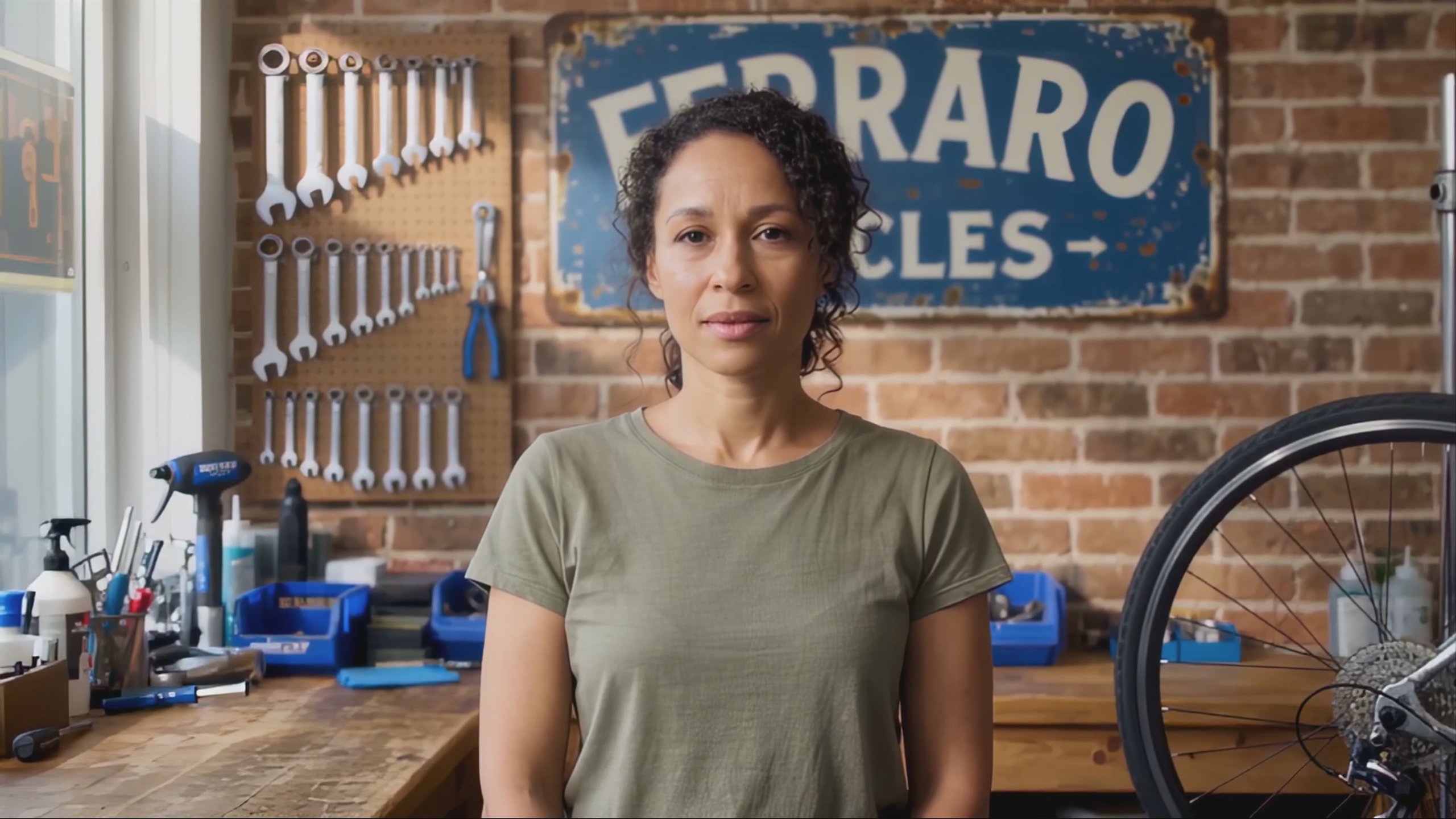
A 854 × 480 clip taken to 1080p by the most faithful model in the catalogue. Switch back and watch the grain return to the sign and the wrenches.

Compare 480p source and 1080p

Both play here at 1080p, which is as far as a web player is worth pushing — the 4K renditions are larger than this page should serve. Measured against the source, this is the pass that moved least.

Topaz Proteus · 1920 × 1080 · 30fps

Upscaling is not a quality dial.

TOPAZ PROTEUS · 1080P · 30FPS KEPT

The model that added least was also the sharpest.

This is the faithful tier, and the hero toggle above is the test: switch to the 480p source and the grain comes back to the sign lettering and the wrenches. What the measurement adds is the part you cannot see by looking — against the source it moved about a third as far as the most expensive tier in the catalogue did, and between consecutive frames it moved less than an ordinary resize does. It is the cheapest path to 1080p here. Going in we assumed a generative tier would win this. It did not.

TOPAZ STARLIGHT PRECISE · 1080P · DIFFUSION

And sometimes you do want it to add.

This is the diffusion tier on the same 480p clip, and it is the honest reason to pay more: it resolves individual curls, skin texture and eyelashes that the source never carried, and it stays the same person. Measured, it strayed no further from the original than the faithful pass did. What it costs shows up somewhere else — the detail it invents is not quite the same detail on every frame, so it moves more between frames than doing nothing at all.

FLUX.3 CREATIVE · 1922 × 1080 · 24FPS FROM 30

Check what comes back, not just how it looks.

All four models on this page were asked for the same thing — 1080p — and returned three different frame sizes and two different frame rates. This clip is one of them: 1922 × 1080 at 24fps, resampled from a 30fps source that nobody asked to be retimed. Nothing about it looks wrong until it lands in a timeline next to the footage it came from. It is the kind of thing worth knowing before a batch runs, which is why it is on the page rather than in a support article.

Upscale it — or render it large to begin with.

TopazTopazTopaz ProteusStarlight PreciseStarlight HQStarlight FastHyperion 2.5 HDR
Black Forest LabsBlack Forest LabsFLUX.3 PreciseFLUX.3 Creative
GoogleGoogleGemini Omni 1.1 Flash · 4K
ByteDanceByteDanceSeedance 2.0 · 4K
See all models →

Built for visual inference.

Serving video is a different problem from serving text — a single request can saturate a GPU, and none of the tricks that made language models cheap apply. Hedra's engine was built for exactly that workload.

Whichever model you choose — ours or anyone else's — it runs on the same infrastructure, behind one key. Which is what makes the honest workflow affordable: generate a clip at 720p with one vendor's model, finish it with another vendor's upscaler in the same request chain, and compare two tiers on the same second of footage before committing a batch.

Generate with API or Agent

Build with the API

One key, every tier. Point it at a back catalogue and set the model per clip.

Start building now

Upscale a clip now.

No code — drop in the footage, pick a tier, compare it against the source before you keep it.

Create with Agent

FAQs

If the footage has the detail and is simply small or compressed, Topaz Proteus: when we measured it on a 480p clip it diverged least from the source, came back steadier frame to frame than the source itself, and it is the cheapest tier. If the footage genuinely lacks detail — old, soft or AI-generated — Starlight is built for that and added real detail without losing the face. Compare both on one clip before committing a batch; that costs a few seconds of footage.

Video models →
The generative tiers will, and that is what they are for. The thing to know is that video has a failure mode a still does not: invented detail has to be the same invented detail on the next frame, or it crawls. Measured on regions of the frame that barely move, the faithful tier moved less than an ordinary resize did and the generative tiers moved more — so on footage that already has its detail, adding nothing is genuinely the better picture.

Not necessarily, and it is worth checking before a batch. Asked for 1080p, the four models on this page returned three different frame sizes — 1920 × 1080, 1918 × 1078 and 1922 × 1080 — and the FLUX.3 pair returned 24fps from a 30fps source. Topaz Proteus was the one that returned exactly what was requested. Every output reports its own width, height and fps back, so a pipeline can assert on them.

It depends on the model, and the spread is wide: Topaz Proteus takes up to ten minutes in one request, the Starlight tiers up to five, and the FLUX.3 pair up to twenty seconds. For anything feature-length the choice is made for you.

Browse all models →

Yes, and it is the cheaper way to ship high-resolution generated footage: render at 720p and finish with an upscaler rather than paying to generate at 4K. Starlight Precise is built specifically for generated and archival video. The clip in the hero of this page was made exactly that way.

Two things. Proteus can interpolate to 60fps in the same pass, so the choice is frames as well as pixels. And Hyperion converts SDR to 10-bit HDR while keeping the source resolution — it sits in the upscaler family without upscaling anything, for footage whose problem is tonal range rather than size.

By the second of footage, at a rate that depends on the model and the output size. The faithful tier is the cheapest path to 1080p in the catalogue and the generative tiers cost several times more; each model page carries its own rate.

See model pricing →

No — Hedra Studio runs the same models on the same engine with nothing to build. Drop in the clip, pick a tier, and compare it against the source before you keep it.

More you can do with Hedra

A frame of the upscaled clip, the sign lettering and brick sharp
Do the same for a photographAI IMAGE UPSCALER →
Honey pouring from a glass jar onto a wooden spoon against a dark background
Make the footage in the first placeIMAGE TO VIDEO AI →
hedra keys create
→ sk-hedra-••••••••
Run a back catalogue through itDEVELOPER PLATFORM →

Add pixels. Not opinions.

Start building nowUPSCALE A CLIP NOW — NO CODE →
Hedra
Hedra

Product

DevelopersStudioEnterpriseInferencePricing

Resources

Agent documentationDeveloper documentationBlogUse CasesModelsFeedbackChangelogStatus

Company

AboutCareersContactBuilder programSupportAlternatives

Legal

Privacy PolicyTerms of useAcceptable useCookie PolicyBiometric data policy
LinkedinInstagramDiscord
support@hedra.comHedra 2026 — All rights reserved