How to Make AI Images Look Like Real Photos by Prompting
What gives an AI image away, in 2026, is rarely resolution — models render plenty of detail. It's that the image is too good: too clean, too evenly lit, too symmetrical, too composed. Real photos are full of small failures — a blown-out flash, a tilted horizon, a missed focus, an ugly fluorescent tube. This is a short tutorial on prompting GPT Image 2 Medium to make those failures on purpose, so the result reads as a real, candid photo instead of AI slop.
Every shot here is a real GPT Image 2 Medium generation made from prompt text alone — no reference images (those are a companion post). Four examples, each showing one technique.
These stills aren't the end goal — they're inputs for video, and an authentic video starts with an authentic still. Image-to-video and reference-driven models generate from a start frame or a reference image, so if that input looks like AI slop, the footage will too; if it reads as a real photo, so can the video built from it. Everything below is about getting that input right.
Describe the capture, not the beauty
Every image model has a default: the clean, obvious, on-the-nose version of your prompt — and that default is the slop. Your job is to push it off that path. The first mistake people make pushes it the wrong way — prompting the subject and asking for quality ("a beautiful woman, ultra-realistic, 8K, masterpiece"), which trips the model's aesthetic mode and hands you the glossy, plastic look. Flip it — describe the capture (camera, lens, light, imperfections) and let the subject be ordinary. And cut the quality words: on GPT Image 2 Medium, 8K, ultra-realistic, hyperrealistic, cinematic, and masterpiece all push toward fake. Replace each one with a concrete photographic fact.
Lean amateur
Start here: a photo reads as real when it was taken badly — fast, in bad light, without a thought for composition. Our backyard-party flash snapshot is exactly that — a cheap on-camera flash, hotspot on the faces, the background into near-black, motion blur, a tilt, red cups on a folding table. None of it is "good," and all of it is what a real phone photo actually looks like.
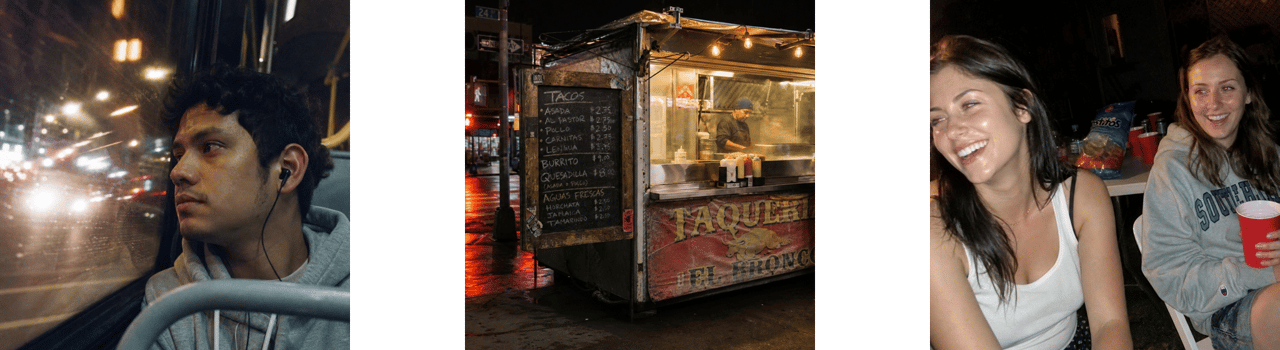
candid amateur flash snapshot, harsh direct on-camera flash, bright hotspot on the faces, background falling into near-black, slight motion blur, framing a little tilted, ordinary everyday people, unposed
Not one quality word in it — that's the point.
Commit to a camera effect
Half-committing creates the uncanny valley — neither convincingly amateur nor cleanly pro, just off. Pick one effect and push it all the way. Our night-bus reflection was a forgettable shot of a guy on a bus until we went all-in on the lit city reflected and motion-streaked across the glass, on fast film with heavy grain and halation.
shot on fast 35mm film at night, the neon-lit street reflected and motion-streaked across the window glass over his profile, heavy grain, halation around the bright lights, mixed warm-streetlight and cool-fluorescent color
If a "nice" image still feels AI, you probably under-committed.
Honest light over golden hour
Golden hour is an AI signature now — every model reaches for it, so warm, low, raking sun has started to read as a tell in itself. Real photos are mostly taken in plain, unflattering light. Our overcast coastline leans in: flat grey light, muted cool color, a horizon a hair off level, litter on the rocks — unspectacular on purpose.
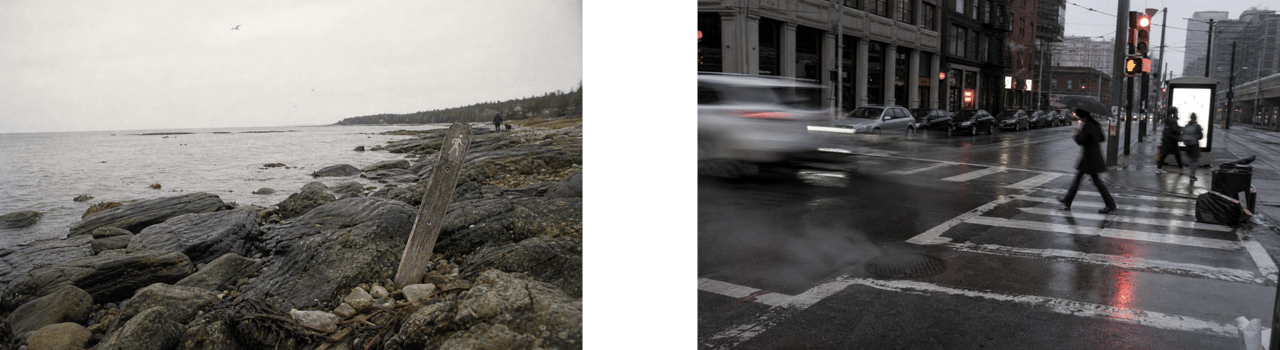
flat overcast daylight, no sun, muted cool color, slightly tilted horizon, shot on Kodak Gold 200, fine grain
Name the unflattering light instead of "good lighting," and name a film stock instead of letting saturation run.
Humble gear, real flaws
Photography language is what GPT Image 2 Medium responds to most for realism — so name the gear, but keep it humble (a phone, a point-and-shoot, a Ricoh GR III, an old Canon AE-1), not a studio rig, which reads as stock. Then add optical truth: fine film grain, slight chromatic aberration, a soft / slightly missed focus, mild over-exposure with a few blown highlights, gentle vignetting. One caution: a few stocks are now so over-prompted they read as trying to look like film — Portra 400 and Cinestill 800T especially. Reach for Gold 200, Ektachrome, or Ilford HP5 instead.
Don't leave gaps for the model to fill
Anything you don't direct, the model fills with its default — the clean, generic, obvious choice. So either direct a detail or remove it. Our flower-shop owner is built from directed, unglamorous specifics: harsh cool shop fluorescents instead of soft light, a candid moment with her looking down at her hands rather than at the camera, off-center framing, the clutter of a real workbench. And we dropped the decorative signage rather than let the model fill it generically — if a detail isn't the point of the shot and you won't art-direct it, keep it out of frame. (Directing the details you do want — a real menu, a specific product — is the reference technique in the next post.)
A word on people
The amateur-capture trick carries people, too: in the party shot, the flash and the candid moment do the work — no perfect face required. When you do describe someone, give concrete, neutral specifics — an age range, an occupation, real skin texture, an in-between expression — rather than what they aren't ("average," "not a model"), which the model ignores. For a consistent person you can reuse across shots, prompting alone won't cut it — that calls for a reference "actor," in the companion post.
The recipe
Describe the capture, not the beauty. Cut the quality words. Lean amateur. Commit to one camera effect. Use honest light over golden hour. Name humble gear and add real flaws. Keep invented text out. Keep the subject ordinary and off-center.
Do that, and the output stops reading as AI. Then don't stop at the still: feed one of these frames into a video model like Seedance as a start frame or reference, and the same realism carries into the footage. (Our Beats walkthrough covers directing the video itself.)
See all four stills in the GPT Image 2 Medium gallery, each with the prompt that made it, then make your own on Hedra. The companion post covers reference images — building the people, places, and props before you generate.